基本信息
源码名称:mp3音乐播放器 示例源码(AxWindowsMediaPlayer)
源码大小:12.70M
文件格式:.zip
开发语言:C#
更新时间:2018-04-24
友情提示:(无需注册或充值,赞助后即可获取资源下载链接)
嘿,亲!知识可是无价之宝呢,但咱这精心整理的资料也耗费了不少心血呀。小小地破费一下,绝对物超所值哦!如有下载和支付问题,请联系我们QQ(微信同号):78630559
本次赞助数额为: 5 元×
微信扫码支付:5 元
×
请留下您的邮箱,我们将在2小时内将文件发到您的邮箱
源码介绍
可播放mp3 声音,使用的AxWindowsMediaPlayer控件,附加上数据库即可测试(无需配置连接串)
可播放mp3 声音,使用的AxWindowsMediaPlayer控件,附加上数据库即可测试(无需配置连接串)
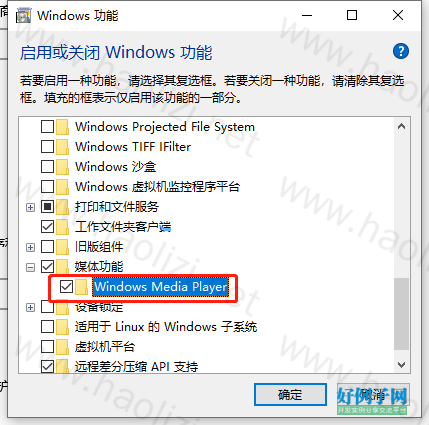
需要启用 Windows Media Player 功能,否则会提示【System.Runtime.InteropServices.COMException:“没有注册类】
操作步骤:控制面板>>程序>>启用或者关闭windows 功能>>选中 媒体功能>>Windows Media Player,点击确定即可
using System;
using System.Collections.Generic;
using System.ComponentModel;
using System.Data;
using System.Drawing;
using System.Linq;
using System.Text;
using System.Windows.Forms;
using System.Runtime.InteropServices;
using System.Data.SqlClient;

namespace MP3Player
{
    public partial class frmYinYue : Form
    {
        public frmYinYue()
        {
            InitializeComponent();
        }
        //***********************
        private Point mouseOffset;//记录鼠标坐标
        private bool isMouseDown = false;//是否按下鼠标
        bool flag = false;//判断是播放还是打开选择窗口
        static bool MM = true;//记录是否静音
        static bool XX = true;//记录是否暂停
        //***********************

        private void Form1_Load(object sender, EventArgs e)
        {

        }

        private void pictureBox1_Click(object sender, EventArgs e)
        {
            this.WindowState = FormWindowState.Minimized;
        }

        private void pictureBox2_Click(object sender, EventArgs e)
        {
            Application.Exit();
        }

        #region 移动无边框窗体
        private void pictureBox3_MouseDown(object sender, MouseEventArgs e)
        {
            int xOffset;
            int yOffset;
            if (e.Button == MouseButtons.Left)
            {
                xOffset = -e.X;
                yOffset = -e.Y;
                mouseOffset = new Point(xOffset, yOffset);
                isMouseDown = true;
            }
        }

        private void pictureBox3_MouseMove(object sender, MouseEventArgs e)
        {
            if (isMouseDown)
            {
                Point mousePos = Control.MousePosition;
                mousePos.Offset(mouseOffset.X, mouseOffset.Y);
                Location = mousePos;
            }
        }

        private void pictureBox3_MouseUp(object sender, MouseEventArgs e)
        {
            if (e.Button == MouseButtons.Left)
            {
                isMouseDown = false;
            }
        }
        #endregion


        private void pictureBox4_Click(object sender, EventArgs e)//打开播放
        {

            Music();
            axWindowsMediaPlayer1.URL = Tools.Address;
            m = 1;
            lblSongTitle.Text = " 歌曲名称:"   axWindowsMediaPlayer1.currentMedia.getItemInfo("Title");

        }

        public void Music()
        {
            string sql = "select * from Yy";
            if (Tools.CiShu > 0)
            {
                sql  = string.Format(" where Id='{0}'", Tools.CiShu);
            }
            SqlConnection conn = new SqlConnection(DBHelper.ConStr);
            try
            {
                conn.Open();
                SqlCommand comm = new SqlCommand(sql, conn);
                SqlDataReader reader = comm.ExecuteReader();
                while (reader.Read())
                {
                    //Tools.Address = reader["Address"].ToString();
                    Tools.Address = System.IO.Path.Combine(AppDomain.CurrentDomain.BaseDirectory, "Music/命运交响曲-张智霖.mp3");
                }
                reader.Close();
            }
            catch (Exception ex)
            {

                MessageBox.Show(ex.Message);
            }
            finally
            {
                conn.Close();

            }
        }
        private void pictureBox5_Click(object sender, EventArgs e)//暂停
        {
            axWindowsMediaPlayer1.Ctlcontrols.pause();
            flag = true;
        }

        private void pictureBox6_Click(object sender, EventArgs e)//停止
        {
            axWindowsMediaPlayer1.Ctlcontrols.stop();
            flag = false;
        }


        private void pictureBox7_Click(object sender, EventArgs e)//静音
        {
            if (MM)
            {
                pictureBox7.Image = (Image)Properties.Resources.静音;
                axWindowsMediaPlayer1.settings.mute = true;
                MM = false;
            }
            else
            {
                pictureBox7.Image = (Image)Properties.Resources.增大音量;
                axWindowsMediaPlayer1.settings.mute = false;
                MM = true;
            }
        }
        #region 按钮
        private void pictureBox4_MouseEnter(object sender, EventArgs e)
        {
            pictureBox4.Image = (Image)Properties.Resources.播放;
        }

        private void pictureBox4_MouseLeave(object sender, EventArgs e)
        {
            pictureBox4.Image = (Image)Properties.Resources.播放;
        }

        private void pictureBox5_MouseEnter(object sender, EventArgs e)
        {
            pictureBox5.Image = (Image)Properties.Resources.暂停;
        }

        private void pictureBox5_MouseLeave(object sender, EventArgs e)
        {
            pictureBox5.Image = (Image)Properties.Resources.暂停;
        }

        private void pictureBox6_MouseEnter(object sender, EventArgs e)
        {
            pictureBox6.Image = (Image)Properties.Resources.停止;
        }

        private void pictureBox6_MouseLeave(object sender, EventArgs e)
        {
            pictureBox6.Image = (Image)Properties.Resources.停止;
        }
        int m = 0;
        private void timer1_Tick(object sender, EventArgs e)
        {
            int i = (int)axWindowsMediaPlayer1.playState;
            switch (i)
            {
                case 1: lblStauts.Text = "状态:停止"; break;
                case 2: lblStauts.Text = "状态:暂停"; break;
                case 3: lblStauts.Text = "状态:播放"; break;
                case 6: lblStauts.Text = "状态:正在缓冲"; break;
                case 9: lblStauts.Text = "状态:正在连接"; break;
                case 10: lblStauts.Text = "状态:准备就绪"; break;
            }
            lbljindu.Text = axWindowsMediaPlayer1.Ctlcontrols.currentPositionString;
            if (m == 1)
            {
                hScrollBar1.Maximum = (int)axWindowsMediaPlayer1.currentMedia.duration;
                hScrollBar1.Minimum = 0;
                hScrollBar1.Value = (int)axWindowsMediaPlayer1.Ctlcontrols.currentPosition;
                hScrollBar2.Value = axWindowsMediaPlayer1.settings.volume;
            }
        }

        private void hScrollBar1_Scroll(object sender, ScrollEventArgs e)
        {
            axWindowsMediaPlayer1.Ctlcontrols.currentPosition = e.NewValue;
        }

        private void hScrollBar2_Scroll(object sender, ScrollEventArgs e)
        {
            axWindowsMediaPlayer1.settings.volume = e.NewValue;
        }

        private void axWindowsMediaPlayer1_Enter(object sender, EventArgs e)
        {

        }
        #endregion


        /// <summary>
        /// 上一首
        /// </summary>
        /// <param name="sender"></param>
        /// <param name="e"></param>
        private void pictureBox8_Click(object sender, EventArgs e)
        {
            if (i == 1)
            {
                i = 52;
            }
            i--;
            Tools.CiShu = i;
            Music();
            axWindowsMediaPlayer1.URL = Tools.Address;
            m = 1;
            lblSongTitle.Text = " 歌曲名称:"   axWindowsMediaPlayer1.currentMedia.getItemInfo("Title");
        }
        /// <summary>
        /// 下一首
        /// </summary>
        /// <param name="sender"></param>
        /// <param name="e"></param>
        int i = 0;
        private void pictureBox9_Click(object sender, EventArgs e)
        {

            if (i == 50)
            {
                i = 1;
            }
            i  ;

            Tools.CiShu = i;
            Music();
            axWindowsMediaPlayer1.URL = Tools.Address;
            m = 1;
            lblSongTitle.Text = " 歌曲名称:"   axWindowsMediaPlayer1.currentMedia.getItemInfo("Title");
        }

        private void pictureBox3_Click(object sender, EventArgs e)
        {

        }
    }
}