基本信息
源码名称:C# 音乐播放器示例源码(支持 播放,暂停,上一曲,下一曲)
源码大小:0.17M
文件格式:.rar
开发语言:C#
更新时间:2019-04-17
友情提示:(无需注册或充值,赞助后即可获取资源下载链接)
嘿,亲!知识可是无价之宝呢,但咱这精心整理的资料也耗费了不少心血呀。小小地破费一下,绝对物超所值哦!如有下载和支付问题,请联系我们QQ(微信同号):78630559
本次赞助数额为: 2 元×
微信扫码支付:2 元
×
请留下您的邮箱,我们将在2小时内将文件发到您的邮箱
源码介绍
音乐播放器,播放,暂停,上一曲,下一曲音乐播放器,播放,暂停
音乐播放器,播放,暂停,上一曲,下一曲音乐播放器,播放,暂停
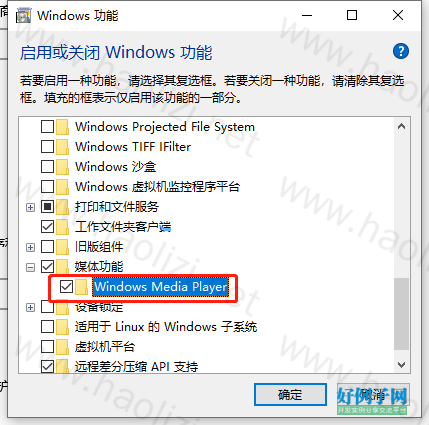
需要启用 Windows Media Player 功能,否则会提示【System.Runtime.InteropServices.COMException:“没有注册类】
操作步骤:控制面板>>程序>>启用或者关闭windows 功能>>选中 媒体功能>>Windows Media Player,点击确定即可
using System;
using System.Collections.Generic;
using System.ComponentModel;
using System.Data;
using System.Drawing;
using System.Text;
using System.Windows.Forms;
using System.Xml;
using System.IO;

namespace 音乐播放器v1._
{
    public partial class Form1 : Form
    {
        public Form1()
        {
            InitializeComponent();
        }

        public int index = 0;//存放当前音乐索引
        private string path;
        public string Path
        {
            get { return path; }
            set { path = value; }
        }
        public string[] Arrpath;//存储路劲的数组
        public string[] Musicname = new string[2];//音乐名字字符变量

        #region//右击保存音乐
        public void MusicSave(string[] musicname, string[] musicpath)//音乐保存,分别是收藏列表,歌曲名字,歌曲路劲
        {

        }
        #endregion

        private void 添加音乐ToolStripMenuItem_Click(object sender, EventArgs e)
        {
            listBox2.Items.Clear();
            string musicname1 = null;
            int count = 0;
            string[] musicname = new string[2];
            OpenFileDialog open = new OpenFileDialog();
            open.Title = "打开(Open)";
            open.ValidateNames = true;
            open.CheckFileExists = true;
            open.InitialDirectory = @"E:\vs2005\音乐播放器v1.0\音乐播放器v1.0\Music";
            open.CheckPathExists = true;
            open.Multiselect = true;
            open.Filter = "音乐文件(*.mp3;*.wav;*.wma)|*.mp3;*.wav;*.wma|视频音乐文件(*.mp4;*.avi)|*.mp4;*.avi|所有文件(*.*)|*.*";
            try
            {
                if (open.ShowDialog() == DialogResult.OK)
                {
                    Arrpath = new string[open.FileNames.Length];
                    foreach (string p in open.FileNames)
                    {
                        count  ;
                        for (int i = count - 1; i < open.FileNames.Length; i  )
                        {
                            Arrpath[i] = p;//路径
                        }
                    }
                    for (int j = 0; j < Arrpath.Length; j  )//取得音乐名字的数组
                    {
                        string fm = Arrpath[j].ToString(), fh = null;
                        for (int i = 0; i < fm.Length; i  )
                        {
                            fh = fm[i].ToString();
                            if (fh == @"\")
                                musicname1 = fm.Substring(i   1, fm.Length - 1 - i);
                        }
                        musicname = musicname1.Split('.');
                        if (musicname[0] != "")
                            listBox2.Items.Add("("   (j   1)   ")  "   musicname[0]);
                    }
                }
                axWindowsMediaPlayer1.URL = Arrpath[0].ToString();
                string time = axWindowsMediaPlayer1.currentMedia.durationString;
            }
            catch
            {
                listBox2.Items.Clear();
                listBox2.Items.Add("出错了,请退出程序!");
            }
        }


        private void listBox2_SelectedIndexChanged(object sender, EventArgs e)
        {

        }

        private void 播放音乐toolStripMenuItem1_Click(object sender, EventArgs e)
        {
            try
            {
                index = listBox2.SelectedIndex;
                axWindowsMediaPlayer1.URL = Arrpath[index].ToString();
            }
            catch (Exception ex)
            {
                MessageBox.Show("没有找到该音乐!");
            }
        }

        private void 停止ToolStripMenuItem_Click(object sender, EventArgs e)
        {
            try
            {
                axWindowsMediaPlayer1.Ctlcontrols.stop();
            }
            catch (Exception ex)
            { MessageBox.Show("为选中播放音乐"); }
        }

        private void 暂停ToolStripMenuItem_Click(object sender, EventArgs e)
        {
            try
            {
                axWindowsMediaPlayer1.Ctlcontrols.pause();
            }
            catch (Exception ex)
            { MessageBox.Show("为选中播放音乐"); }
        }

        private void 下一曲ToolStripMenuItem_Click(object sender, EventArgs e)
        {
            try
            {

                axWindowsMediaPlayer1.URL = Arrpath[index   1].ToString();
                listBox2.SelectedIndex = index   1;
                index  = 1;
            }
            catch (Exception ex)
            {
                MessageBox.Show("已近是最后一首了!");
            }
        }

        private void 播放ToolStripMenuItem_Click(object sender, EventArgs e)
        {
            try
            {

                axWindowsMediaPlayer1.URL = Arrpath[index   1].ToString();
                listBox2.SelectedIndex = index   1;
                index  = 1;
            }
            catch (Exception ex)
            {
                MessageBox.Show("已近是第一首了!");
            }
        }

        private void 继续播放ToolStripMenuItem_Click(object sender, EventArgs e)
        {
            try
            {
                axWindowsMediaPlayer1.Ctlcontrols.play();
            }
            catch (Exception ex)
            { MessageBox.Show("为选中播放音乐"); }
        }

        private void 移除列表ToolStripMenuItem_Click(object sender, EventArgs e)
        {
            try
            {
                int j = listBox2.SelectedIndex;
                listBox2.Items.RemoveAt(listBox2.SelectedIndex);

                for ( int i = listBox2.SelectedIndex; i <= listBox2.Items.Count-2; i  )
                {
                    Arrpath[i] = Arrpath[i   1];
                }
            }
            catch (Exception ex)
            {
                MessageBox.Show("请选中要移除的项", "提示", MessageBoxButtons.OK, MessageBoxIcon.Error);
            }
        }

        private void listBox2_MouseDoubleClick(object sender, MouseEventArgs e)
        {
            try
            {
                index = listBox2.SelectedIndex;
                axWindowsMediaPlayer1.URL = Arrpath[index].ToString();
            }
            catch (Exception ex)
            {
                MessageBox.Show("没有周到该音乐!");
            }
        }

        private void 退出ToolStripMenuItem_Click(object sender, EventArgs e)
        {
            if (MessageBox.Show("你确定要退出?", "提示", MessageBoxButtons.YesNo, MessageBoxIcon.Question).ToString() == "Yes")
            {
                this.Hide();
                axWindowsMediaPlayer1.Ctlcontrols.stop();
            }
        }

    }
}