嘿,亲!知识可是无价之宝呢,但咱这精心整理的资料也耗费了不少心血呀。小小地破费一下,绝对物超所值哦!如有下载和支付问题,请联系我们QQ(微信同号):78630559
本次赞助数额为: 2 元微信扫码支付:2 元
请留下您的邮箱,我们将在2小时内将文件发到您的邮箱
一个wpf做的广告程序,是否循环播放图片和视频 全屏播放功能。
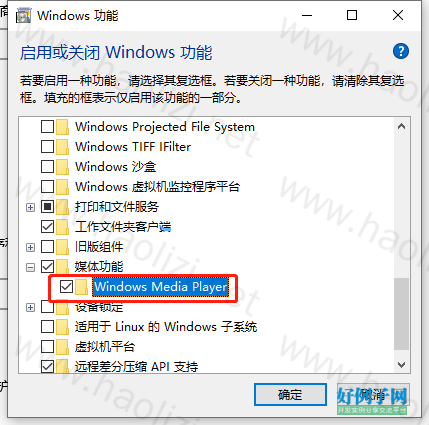
需要启用 Windows Media Player 功能,否则会提示【System.Runtime.InteropServices.COMException:“没有注册类】
操作步骤:控制面板>>程序>>启用或者关闭windows 功能>>选中 媒体功能>>Windows Media Player,点击确定即可
using System;
using System.Collections;
using System.Collections.Generic;
using System.ComponentModel;
using System.Data;
using System.Drawing;
using System.IO;
using System.Linq;
using System.Text;
using System.Threading.Tasks;
using System.Windows.Forms;
using System.Configuration;
namespace HospitalFrontTVSystem
{
public partial class MainForm : Form
{
//服务器uri
string serviceUri = ConfigurationSettings.AppSettings["constri"].ToString();
string screen = ConfigurationSettings.AppSettings["screen"].ToString();
string interval = ConfigurationSettings.AppSettings["interval"].ToString();
string deviceId = ConfigurationSettings.AppSettings["deviceId"].ToString(); //获取配置文件里的值
//缓存的资源路径
List<string> resoures = new List<string>();
//本地播放资源路径
string fileBasePath = AppDomain.CurrentDomain.BaseDirectory "playResources\\";
public MainForm()
{
InitializeComponent();
//RunAutoClass.SetAutoRun();
this.Left = Screen.AllScreens[0].Bounds.Width*Int32.Parse(screen);
this.Top = 0;
this.FormBorderStyle = System.Windows.Forms.FormBorderStyle.None;//全屏无边框
this.WindowState = System.Windows.Forms.FormWindowState.Maximized;
this.axWindowsMediaPlayer1.uiMode = "none";//除去视频播放器其他功能按钮
}
private void MainForm_Load(object sender, EventArgs e)
{
pictureBox2.Left =860;
pictureBox2.Top = 540;
//timerForGetResouse.Enabled = true;//启动线程链接服务器并缓存数据
timerForImaChange.Interval = Int32.Parse(interval) * 1000;
BackgroundWorker bw = new BackgroundWorker();
bw.DoWork = (ee, se) =>
{
timerForGetResouseFun();
};
bw.RunWorkerAsync();
}
/// <summary>
/// 线程 获取服务器数据
/// </summary>
/// <param name="sender"></param>
/// <param name="e"></param>
protected void timerForGetResouseFun()
{
if (!Directory.Exists(fileBasePath))
{
//如果不存在就创建文件夹
Directory.CreateDirectory(fileBasePath);
}
if (serviceUri != null && deviceId!=null)
{
string serReturn = HttpClass.HRequest(serviceUri "/itf/advert/getAdvertInfo?deviceId=" deviceId);//接受服务器资料
if (serReturn != null)
{
List<string> tb = serReturn.Split(';').ToList<string>();
if (tb != null && tb.Count > 0)
{
for (int i = 0; i < tb.Count; i )
{
string[] tem = tb[i].Split(',');
if (tem != null && tem.Length > 0)
{
string filePath = tem[tem.Length - 1];
int sNum = filePath.LastIndexOf('/') 1;
int endNum = filePath.Length - sNum;
string fileName = filePath.Substring(sNum, endNum);
//首先用utf-8进行解码
fileName = System.Web.HttpUtility.UrlDecode(fileName);
//判断根目录是否已存在相同命名的文件
if (!File.Exists(fileBasePath fileName))
{
string webSerResourse = serviceUri filePath;
System.Net.WebClient myWebClient = new System.Net.WebClient();
myWebClient.DownloadFile(webSerResourse, fileBasePath fileName);//缓存资源
}
resoures.Add(fileName);
}
}
}
else
{
MessageBox.Show("服务器没有可播放的资源");
}
}
else
{
MessageBox.Show("服务器没有可播放的资源");
}
}
else
{
MessageBox.Show("请在配置文件中完善配置信息");
}
}
int Index = 0;//播放索引
List<Image> imgs = new List<Image>();
private void timerForImaChange_Tick_Tick(object sender, EventArgs e)
{
if (resoures.Count == 0) return;
pictureBox2.Visible = false;
try
{
if (Index >= resoures.Count) //播放资源数量
{
Index = 0;
}
if (resoures[Index].Contains("jpg")||resoures[Index].Contains("JPG")||resoures[Index].Contains("png")||resoures[Index].Contains("PNG"))//播放图片
{
if (imgs.Count <= Index)
{
imgs.Add(Image.FromFile(fileBasePath resoures[Index]));
}
pictureBox1.Visible = true;
pictureBox1.Dock = DockStyle.Fill;
pictureBox1.Image = imgs[Index];
}
else//播放视频
{
this.axWindowsMediaPlayer1.Visible = true;
this.axWindowsMediaPlayer1.Dock = DockStyle.Fill;
this.axWindowsMediaPlayer1.URL = fileBasePath resoures[Index];
this.axWindowsMediaPlayer1.stretchToFit = true;
this.axWindowsMediaPlayer1.Ctlcontrols.play();
// this.axWindowsMediaPlayer1.fullScreen = true;
timerForImaChange.Enabled = false;
}
Index ;
}
catch(Exception ex)
{
MessageBox.Show(ex.Message);
}
}
/// <summary>
/// 当播放完视频后继续轮播图片
/// </summary>
/// <param name="sender"></param>
/// <param name="e"></param>
private void axWindowsMediaPlayer1_PlayStateChange(object sender, AxWMPLib._WMPOCXEvents_PlayStateChangeEvent e)
{
if (this.axWindowsMediaPlayer1.status == "已完成")//视频播放完后重新启动线程
{
this.axWindowsMediaPlayer1.Visible = false;
timerForImaChange.Enabled = true;
}
}
/// <summary>
/// 关闭所有线程
/// </summary>
/// <param name="sender"></param>
/// <param name="e"></param>
private void MainForm_FormClosing(object sender, FormClosingEventArgs e)
{
timerForImaChange.Enabled = false;
}
private void axWindowsMediaPlayer1_Enter(object sender, EventArgs e)
{
}
}
}