基本信息
源码名称:C#编程(简单的音乐播放器)
源码大小:0.31M
文件格式:.zip
开发语言:C#
更新时间:2016-07-21
×
请留下您的邮箱,我们将在2小时内将文件发到您的邮箱
源码介绍
程序中出现的音乐文件地址需要在自己电脑上找
程序中出现的音乐文件地址需要在自己电脑上找
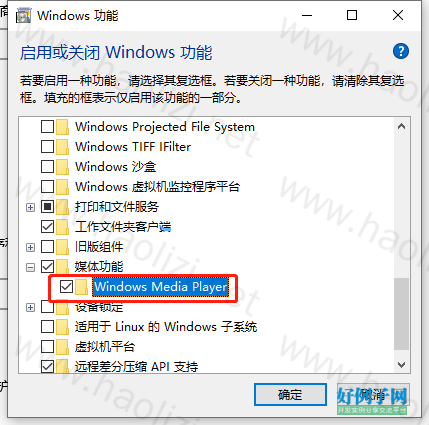
需要启用 Windows Media Player 功能,否则会提示【System.Runtime.InteropServices.COMException:“没有注册类】
操作步骤:控制面板>>程序>>启用或者关闭windows 功能>>选中 媒体功能>>Windows Media Player,点击确定即可
using System;
using System.Collections.Generic;
using System.ComponentModel;
using System.Data;
using System.Drawing;
using System.Linq;
using System.Text;
using System.Windows.Forms;
using System.IO;

namespace MusicPlayer1._0
{
    public partial class Form1 : Form
    {
        Mplayer mplayer = new Mplayer();
        int type = 0;
        public Form1()
        {
            InitializeComponent();
        }

        private void listBox1_Click(object sender, EventArgs e)
        {
            //点击列表播放
            int num = listBox1.SelectedIndex;
            axWindowsMediaPlayer1.Ctlcontrols.playItem(axWindowsMediaPlayer1.currentPlaylist.Item[num]);
        }

        private void 添加音乐ToolStripMenuItem_Click(object sender, EventArgs e)
        {
            //添加音乐到列表
            OpenFileDialog openfile = new OpenFileDialog();
            openfile.Filter = "Mp3文件|*.mp3|Wav文件|*.wav|Wma文件|*.wma|Wmv文件|*.wmv|所有格式|*.*";
            openfile.Multiselect = true;
            mplayer.listnum = listBox1.Items.Count;
            if (openfile.ShowDialog() == DialogResult.OK)
            {
                foreach (string path in openfile.FileNames)
                {
                    axWindowsMediaPlayer1.currentPlaylist.appendItem(axWindowsMediaPlayer1.newMedia(path));
                    mplayer.addfile(path);
                    listBox1.Items.Add(mplayer.listnum.ToString() " " Path.GetFileNameWithoutExtension(path));

                    //保存播放列表
                    StreamWriter streamwriter = File.AppendText("c:/aaa.txt");
                    streamwriter.Write(path "\n");
                    streamwriter.Flush();
                    streamwriter.Close();
                }
            }
        }

        private void 随机播放ToolStripMenuItem_Click(object sender, EventArgs e)
        {
            type = 1;
            int max = listBox1.Items.Count;
            Random rd = new Random();

            int r = rd.Next(0, max);
            axWindowsMediaPlayer1.Ctlcontrols.playItem(axWindowsMediaPlayer1.currentPlaylist.Item[r]);


        }

        private void 顺序播放ToolStripMenuItem_Click(object sender, EventArgs e)
        {
            type = 0;
            axWindowsMediaPlayer1.Ctlcontrols.next();
        }

        private void Form1_Load(object sender, EventArgs e)
        {
            //窗口打开时加载播放列表
            axWindowsMediaPlayer1.currentPlaylist = axWindowsMediaPlayer1.newPlaylist("aaa", "");
            if (File.Exists("c:/aaa.txt"))
            {
                StreamReader streamreader = File.OpenText("c:/aaa.txt");
                int i = 1;
                while (streamreader.EndOfStream!= true)
                {
                    string path = streamreader.ReadLine();
                    axWindowsMediaPlayer1.currentPlaylist.appendItem(axWindowsMediaPlayer1.newMedia(path));
                    listBox1.Items.Add(i.ToString() " " Path.GetFileNameWithoutExtension(path));
                    i ;
                }
                streamreader.Close();
            }
        }


    }
}